Parent-teacher meetings where every child has a time

PTM Connect is an app for schools. The school sets up a parent-teacher meeting, and the app gives every child a time with the class teacher. Parents book nothing: they open the app and see their time.

The app for Android and iPhone is in preparation. It is not in the app stores yet.

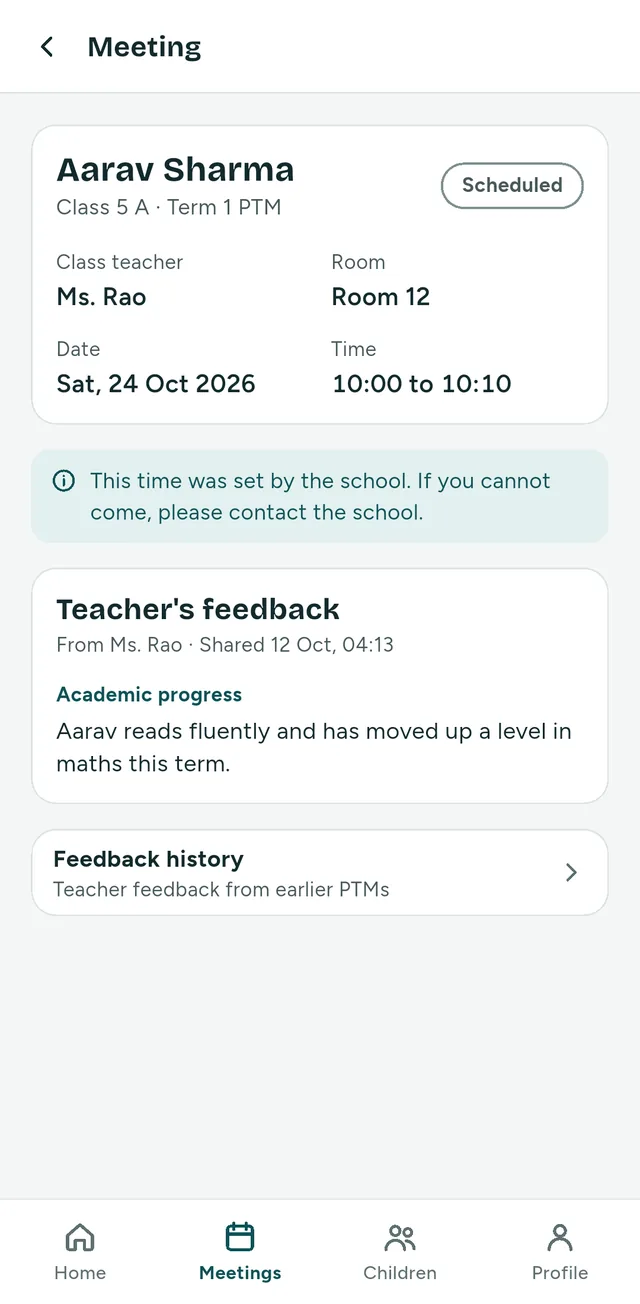
A parent's home screen in the app. Under “Your times” it shows Diya Sharma at 09:00 with Mr. Khan in Room 4, and Aarav Sharma at 09:10 with Ms. Rao in Room 12. A note says: The school has set your times. There is nothing to book.
A parent's home screen. The pictures on this page show the app with made-up sample data.

How a PTM runs

PTM is short for parent-teacher meeting. With PTM Connect, one runs in six steps.

  1. The school sets it up

    The school office chooses the date, the time window, the minutes for each child and the classes that take part.

    Who does it: School office

  2. The app builds the schedule

    Every child gets one time with the class teacher. A teacher never has two children at the same time. Brothers and sisters never get the same time, and are placed one after the other where possible. The school sees a preview before anything is published.

    Who does it: PTM Connect

  3. Everybody is told

    When the school publishes the PTM, parents and teachers are told in the app. A parent sees the time for each child, with the class teacher, the date and the room if the school has set one.

    Who it is for: Parents and teachers

  4. The meetings are held

    The teacher has the children of the class in time order, and marks each meeting as completed or as a no-show.

    Who does it: Teacher

  5. Feedback goes both ways

    The teacher writes feedback for each child in three parts: academic progress, strengths and areas to improve. The parent reads it in the app. After the meeting the parent can rate the conversation from 1 to 5 and add a comment.

    Who does it: Teacher and parent

  6. The school closes the PTM

    From then on nothing can be changed, and everything stays visible. A PTM that nobody closes is closed by the app on the date the school chose.

    Who does it: School office

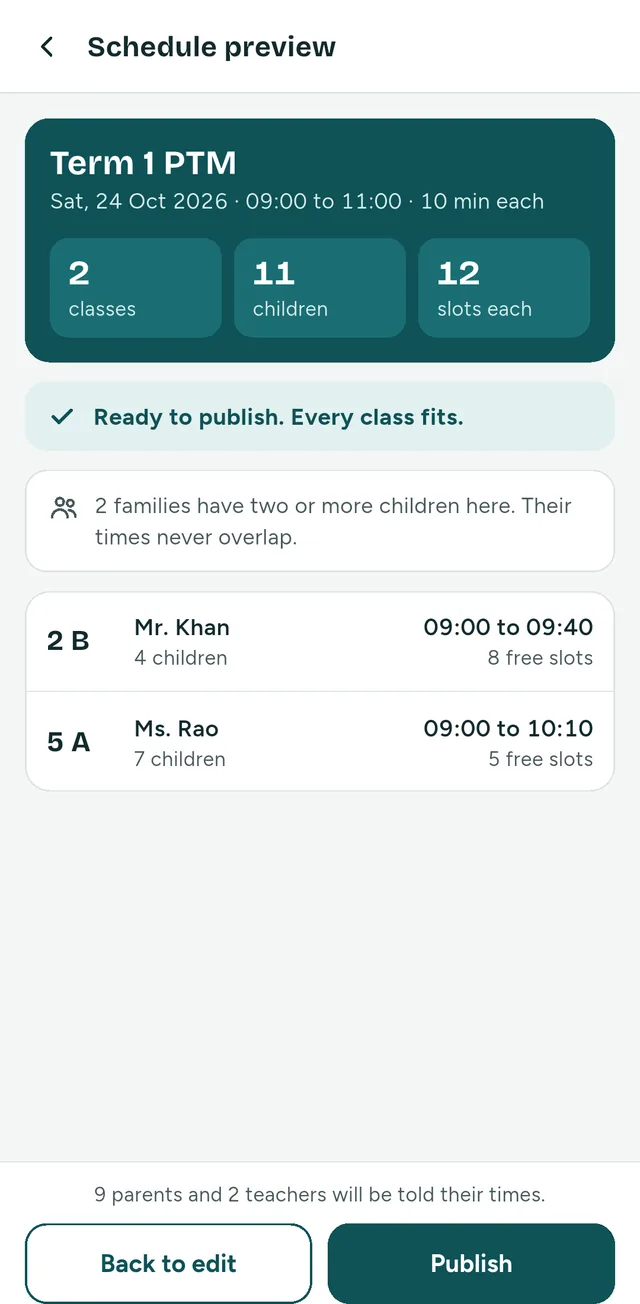
The schedule preview in the app for “Term 1 PTM”: 2 classes, 11 children, 12 slots each. A line says: Ready to publish. Every class fits. Below, each class with its teacher, its first and last time and its free slots.
Step 2: the preview the school office sees before it publishes.

Who uses it

It is one app. What it shows depends on who signs in.

The school office

Sets up the school and the PTM.
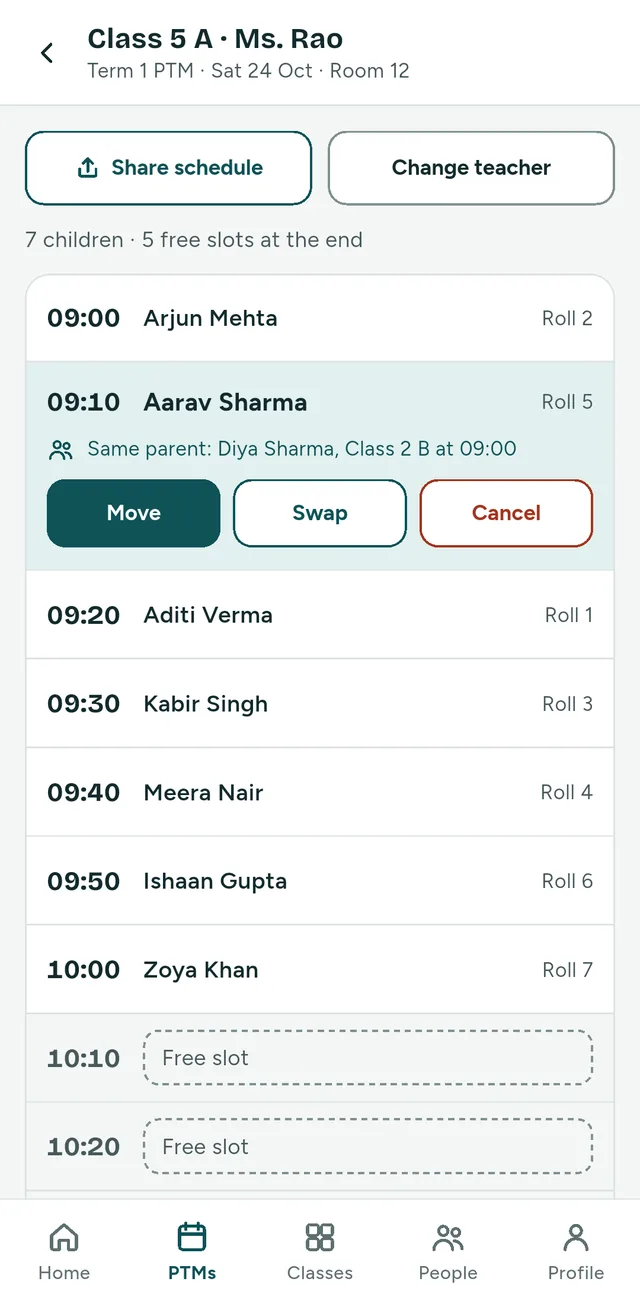
The schedule of class 5 A as the school office sees it: seven children from 09:00 to 10:00 and free slots after them. One appointment is chosen and shows the buttons Move, Swap and Cancel, and a line that the same parent has another child at 09:00.
The schedule of one class, with one appointment chosen.
  • Keeps the list of classes, class teachers and students. Students can be typed in or imported from a CSV file.
  • Hands out the one-time access codes to teachers and parents.
  • Sets up the PTM, checks the preview and publishes it.
  • Can move an appointment to a free time, swap two, or cancel one.
  • Reads the feedback that teachers have shared, and the feedback from parents.
Teachers

Meet the parents of their own classes.

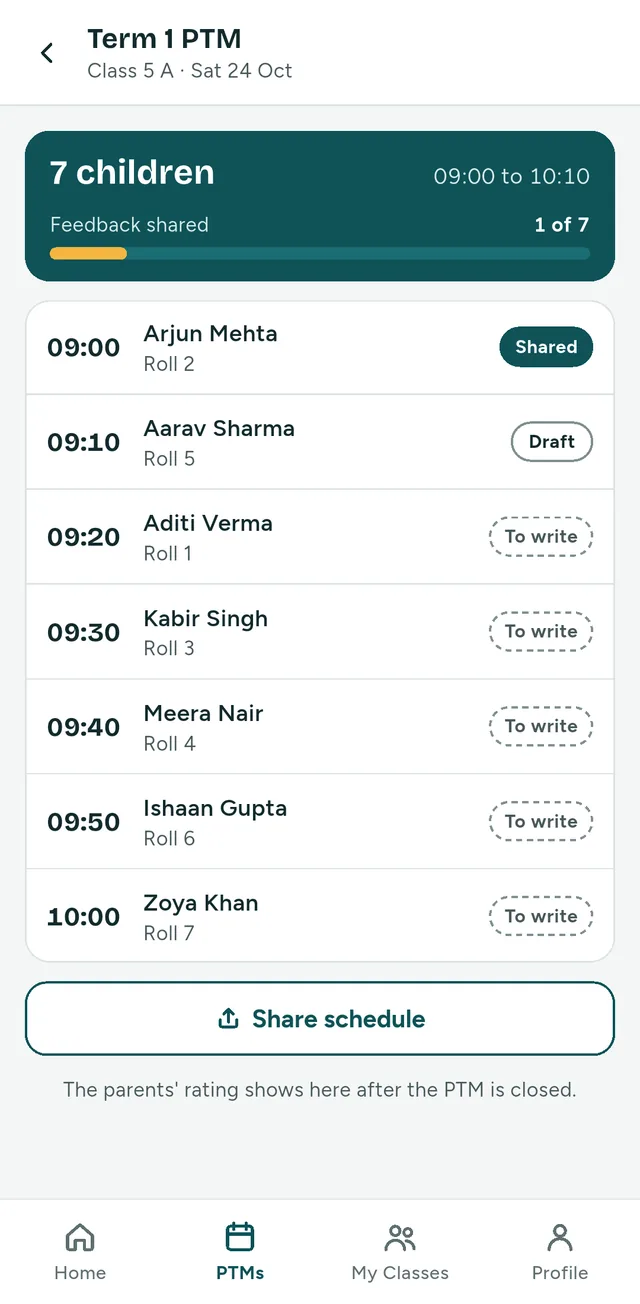
A teacher's schedule for class 5 A on Saturday 24 October: 7 children from 09:00 to 10:10, feedback shared for 1 of 7. Each row has a time, a child and a badge: Shared, Draft or To write. A line at the foot says: The parents' rating shows here after the PTM is closed.
A teacher's schedule: feedback shared, in draft, and still to write.
  • See the schedule of their own classes, in time order.
  • Mark each meeting as completed or as a no-show.
  • Write feedback for each child, save it as a draft, and share it with the parent when it is ready.
  • See for how many children the feedback is shared.
  • After the PTM is closed, see the average of the parents' ratings, when at least 5 parents have responded.

Parents and guardians

See their own children only.

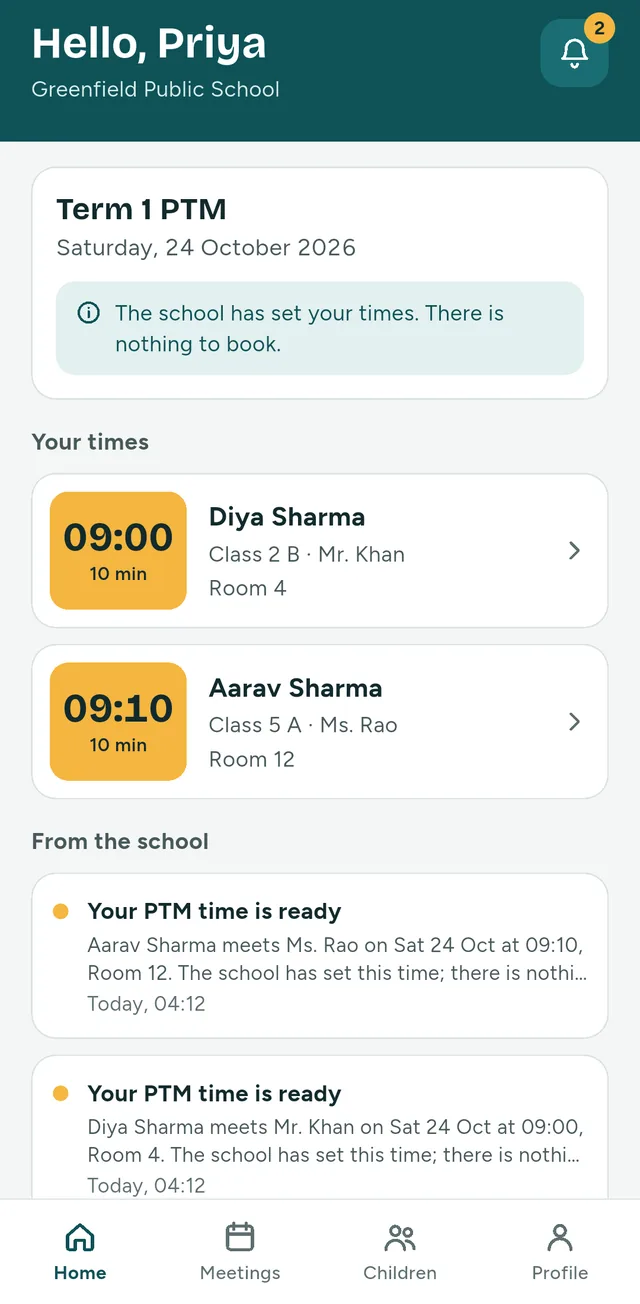
A parent's meeting screen for Aarav Sharma: class teacher Ms. Rao, Room 12, Saturday 24 October 2026, 10:00 to 10:10. A note says: This time was set by the school. If you cannot come, please contact the school. Below it, the teacher's feedback from Ms. Rao under “Academic progress”, and a row that opens the teacher feedback from earlier PTMs.
A parent's meeting screen, with the teacher's feedback.
  • See every child that is registered at the school under their mobile number.
  • See the time for each child. There is nothing to book.
  • Read the teacher's feedback once it is shared, also from earlier PTMs.
  • Rate the conversation after the meeting, and add a comment if they want.
  • Cannot come at the given time? The parent contacts the school, and the school office moves the appointment.

PTM Connect does one job: the parent-teacher meeting, from start to finish.

It is not a school ERP. It does not handle fees, attendance, marks, homework, chat or video calls.

Signing in, without OTP or SMS

Nobody registers by themselves. The school enters its teachers and its students, and the parents' accounts come from the student list.

PTM Connect sends no OTP, SMS, email or WhatsApp message.

The first time
The school hands over a one-time access code. In the app you enter the school code, the mobile number registered at the school and the access code, and choose a password. The code works once.
After that
You sign in with the school code, your mobile number and your password. The app remembers the school code.
Password forgotten
Ask the school for a new access code. It is used in the same way as the first one.

What is stored, and who sees it

The school enters the details of its teachers, its students and their parents. PTM Connect keeps to what the meeting needs.

What is stored

About a child: the name and the class, and the roll number and the admission number if the school enters them. About a parent: the mobile number, and the name if the school enters it. About a teacher: the name, the mobile number, and a staff ID if the school enters one.

The app also keeps what is written in it: the teacher's feedback, the mark completed or no-show, and the parent's rating and comment.

What is not collected

Date of birth, photo, home address, health data and government identifiers.

Who sees a child

A parent sees only their own children. A teacher sees only their own classes, and never a parent's mobile number. A school reaches only its own records.

Who reads the feedback

The teacher's feedback about a child is seen by that teacher, the child's parent and the school office. What a parent writes goes to the school office. The teacher sees only an overall average.

This website sets no cookies and loads nothing from other companies: no analytics, and no fonts or scripts from elsewhere. As web servers do, ours writes a line for each request: the time, the caller's internet address and the page asked for.

Contact

PTM Connect is made by DSONIX. For a question about the app, or about using it at your school, write to us.

Are you a parent or a teacher?

When your school uses PTM Connect, it gives you the school code and your access code. For a question about your child's details or your meeting time, please contact your school.